My name is SUMIT SARKAR and i am graduated in btech with computer scince and engineering from India, Currently working for software company in noida. Internet and web designing is my passion and i believe in helping people with my abilities and knowledge base. i creating thisblog for share my knowledge to all my web family. please support me thank you. I’m just getting this new blog going, so stay tuned for more.
Subscribe below to get notified when I post new updates.
In the series of web designing we start with basic of web designing which we all need to know before coding .
WHAT IS WEBSITE
A website or web site is a collection of web pages, multimedia content, which are typically identified with a common domain name, and published on at least one web server. For examples-wikipedia.org, google.com, and amazon.com etc. we can access any website using web-browser. For example- google chrome, mozilla firefox. internet explorer, opera etc.
The protocol used to access the websites, which in this case is http, meaning port 80. It can also be https; port 443.
WHY CREATE WEBSITES
A website is your most powerful tool for communication
A website is a unique way to connect with the world. Whether you choose to create a website to share your passion for music, inform people of your business, sell products, or any other reason
There is no space better than the Internet to immediately get in touch with a broad international audience at an extremely limited cost.
SKILL EVERY WEB DEVOLOPER NEED TO DESIGN A WEB SITE
HTML/CSS
As a web developer, you’ll need to understand the basics of coding and markup language.
Of all markup languages, Hyper Text Markup Language (HTML) is the standard.
HTML forms practically every web page on the Internet as we know it. How a website functions depends on the way a developer writes the HTML.
But for your website to actually display as a website, we need knowledge of cascading style sheets (CSS) also because it gives the website its style and look.
JAVA SCRIPT
As you master HTML and CSS, eventually you’ll want to learn JavaScript.
JavaScript is a higher level programming language. It makes websites more interactive and functional.
PHOTO SHOP
As a web developer, you’ll want to know your way around Photoshop. It’ll not only make your life easier, but it’ll help you perform better and faster.
You’ll have plenty of fun editing, designing, and stylizing your websites with Photoshop. You may even design a handful of banners and logos for clients throughout your career.
WORDPRESS
It is use to create websites very easily without use of any coding. If you have good knowledge of html, CSS, php, javascript and Mysql then you don’t need to understand wordpress deeply because in this we need to write our content only , there are no use of any type of coding. Hosting etc.
Similar sites like wordpress are:
Wix
Weebly
Joomla!
Squarespace
Webnode
Jimdo
webflow
SEO
SEO stand for search engine optimizer. It is use to show our website on the top of the search result. If SEO not used then our websites not show in the top of search results
A domain name becomes your Business Address so care should be taken to select a domain name. Your domain name should be easy to remember and easy to type
DOMAIN EXTENSION
The final letter at end of internet address is known as top level domain names. They are called top level because they are read from right to left, and the part after the dot is the highest in a hierarchy.
The following table shows the Generic Top-Level Domain names:
Domain
Meaning
.com
Commercial Business
.edu
Education
.gov
U.S. government agency
.int
International Entity
.mil
U.S. military
.net
Networking organization
.org
Non profit organization
SUB DOMAIN
subdomains are dependant on standard domains. They are like an additional level to a domain name. Let’s say for example you own the domain hostinger.com. You can create additional subdomains for your domain like forums.hostinger.com. Since you already own the domain hostinger.com, subdomains for the Domain do not require any additional fees, and you can usually set them up pretty easily.
Domain name registration
Registering a Domain Name is very simple. You can take following step to get your desired domain name registered:
Think of a name that justifies your business need. To find out the available names you can enter a name at commercial domain name registrar such as GoDaddy.
If the domain name entered by you is available, then select that particular domain name.
Now it will ask you for other additional services such as Email inbox, hosting etc. that host also provides. You may choose what’s best for you.
Now they will ask you for your personal information which is stored in WHOIS database.
It will then ask for payment information. Pay for the purchase you have made. Make sure you enter the correct payment information.
Once you are done with all above steps, you are ready to use their tools to upload your stuff to your site.
Domain Name Registrar
There are a number of domain name registrars available in the market. The following table contains some of popular domain name registrars:-
S.N.
Domain Name Registrar
1
Address Creation, LLC
2
Addressonthe web, LLC
3
101domains, INC
4
Atomicdomainnames, LLC
5
BigRock Solutions Ltd
6
Black Ice Domain, Inc
7
Block Host LLC
8
Domain Monkeys, LLC
9
Domain Mantra, Inc.
10
DomainName, Inc.
11
Dot Holding Inc.
12
DotMedia Ltd
13
Extend Names, Inc.
14
Extremely Wild
15
Fast Domain Inc.
16
Google Inc
DOMAIN PRIVACY
When you purchase a domain name, there are several add-on features that you can choose to purchase along with your domain. Some features are useful to everyone like domain privacy. All domain names have a WHOIS listing, that goes into a database of all the registered domains and all the registrant information such as address and contact details associated with a domain. This information on WHOIS is available to everyone over the Internet. Without Domain Privacy Protection, all your data is available to the public. Thus, Domain Privacy Protection is a service that hides all your contact information from the public on WHOIS listing.
Privacy Protection is a service that’s available when you purchase your domain name. It is up to you the user to enable or disable it. You can purchase it, at the time of Transferring or Registering your domain name or at any other point in time as long as your domain name is valid. In fact, if you even purchase an SSL certificate for your domain, depending on your hosting provider you may or may not need not disable your WHOIS privacy temporarily though earlier it was compulsory to do so.
Content management system platform (CMS platform)
CMS is software that allows you to build, manage, and update your website content all in one place.
Plus, it doesn’t require any technical knowledge (which makes it easier for us non-developers and coders).
Long gone are the days of writing out HTML by hand – now, with dynamic sites that can reach into the thousands of pages, a marketing CMS streamlines the work involved in creating new content in unprecedented ways.
With the right marketing CMS, it only takes seconds to bring your ideas to life.
A CMS enables you to make sweeping changes to the look and feel of your site without ever adjusting a single page individually. You can even use a CMS to stay current on the most recent design trends, such as responsive mobile UX.
CMSs are ideal for websites that create and share a lot of content. So, if you have a blog, tutorial website, or portfolio, a CMS is for you. But, honestly, CMS platforms are so versatile these days that you can use them for almost any project you want.
Features of a Good CMS Platform
Each CMS platform comes with some basic and unique features, so it’s important to analyse your options before you select one.
While there are limitless tools and features that could be of immense value to you, here are six core features you should always look for when choosing a CMS platform for your business.
Content Editor
CMS software is made for easy content creation and management, so naturally an easy-to-use content editor is key.
Your business should be able to quickly add, edit, and republish content without the need for specific coding. The best CMS platforms will have a WYSIWYG (What You See Is What You Get) feature to simplify your work.
2. Design Flexibility
With any platform, you don’t want to be confined to the templates and layouts you’re given. Just like your content creation, design edits should be accessible and flexible.
With the right design features and customization tools, your developers should be able to create a website that fits your brand while you can still manage and create content on an easy-to-use interface. Beware of CMSs that restrict your backend edits and customizations.
3. Customization
Speaking of customization, it’s essential to have a CMS that allows you to adapt the look and feel of your content to fit your brand style guide.
Font type, size, header styles, and more should be easily customizable in the text editor – or at least the ability for developers to include the coding for such styles.
4. User Management
If you’re part of a larger company, you’re more than likely to have multiple people using your CMS platform.
Therefore, being able to set permissions and manage users can help give the right people access to essential tools, yet also restrict certain features to managers or higher executives.
5. Integrations
The best marketing CMS option is often the one that integrates with your existing marketing technology stack. That gives you the potential to make your CMS part of your overall marketing automation plan.
Third-party integrations should be easy to add to your CMS so you can automate certain tasks, like gathering contact information in your CRM or promoting your blog post content on social channels.
6. Support
Sometimes, you just don’t know how to do something – which is when you turn to someone else for help.
Having reliable customer support or a wide knowledge base for your CMS can be beneficial not only to you and your problems, but also to your time management.
You won’t be sitting at your desk trying to find a solution; you’ll have immediate access to all the answers, which can save you time and get your work done more efficiently.
For example:-
wordpress
Wix
Weebly
Joomla!
Squarespace
Webnode
Jimdo
Webflow
WEB PAGE
web page is a document available on world wide web. Web Pages are stored on web server and can be viewed using a web browser.
A web page can cotain huge information including text, graphics, audio, video and hyper links. These hyper links are the link to other web pages.
Collection of linked web pages on a web server is known as website. There is unique Uniform Resource Locator (URL) is associated with each web page.
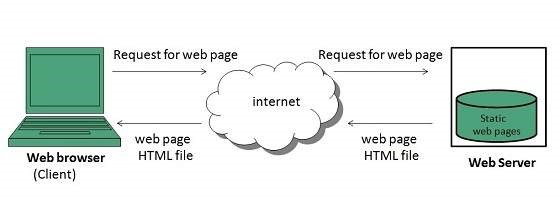
Static Web page
Static web pages are also known as flat or stationary web page. They are loaded on the client’s browser as exactly they are stored on the web server. Such web pages contain only static information. User can only read the information but can’t do any modification or interact with the information.
Static web pages are created using only HTML. Static web pages are only used when the information is no more required to be modified.
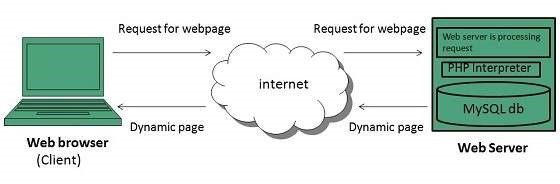
Dynamic Web page
Dynamic web page shows different information at different point of time. It is possible to change a portaion of a web page without loading the entire web page. It has been made possible using Ajax technology.
Server-side dynamic web page
It is created by using server-side scripting. There are server-side scripting parameters that determine how to assemble a new web page which also include setting up of more client-side processing.
Client-side dynamic web page
It is processed using client side scripting such as JavaScript. And then passed in to Document Object Model (DOM).
SL NO
STATIC WEBPAGES
DINAMIC WEBPAGES
1.
In static web pages, Pages will remain same until someone changes it manually.
In dynamic web pages, Content of pages are different for different visitors.
2.
Static Web Pages are simple in terms of complexity.
Dynamic web pages are complicated.
3.
In static web pages, Information are change rarely.
In dynamic web page, Information are change frequently.
4.
Static Web Page takes less time for loading than dynamic web page.
Dynamic web page takes more time for loading.
5.
In Static Web Pages, database is not used.
In dynamic web pages, database is used.
6.
Static web pages are written in languages such as: HTML, JavaScript, CSS, etc.
Dynamic web pages are written in languages such as: CGI, AJAX, ASP, ASP.NET, etc.
PUBLISHING AND DEVELOPMENT TOOLS
we will need some fundamental tools and hardware requirement that we use for developing a websites
Firstly, you should have a basic package of internet that has a good upload speed, minimally 1Mbps. Secondly, you should have a computer with any Operating System (it can be Linux, iOS X or Windows). Then the hardware specifications should be minimum – 1-2 GB RAM, Processor should be at least a Dual-Core and the hard disk must be around 80 GB.
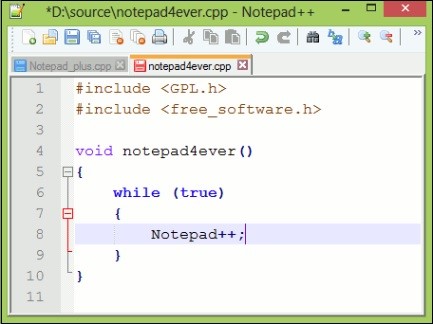
The next step is – you should have a text editor that will help you for code writing and editing. Some of the best text editors for this purpose are as mentioned below.
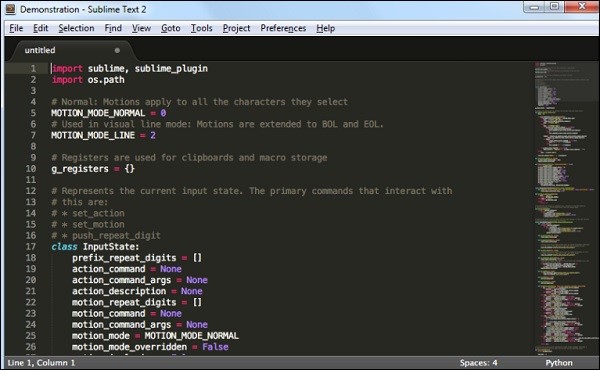
TEXT SUBLIME
Text sublime can be downloaded from https://www.sublimetext.com/. It is good because the text changes the color of the parameters depending on their functions.
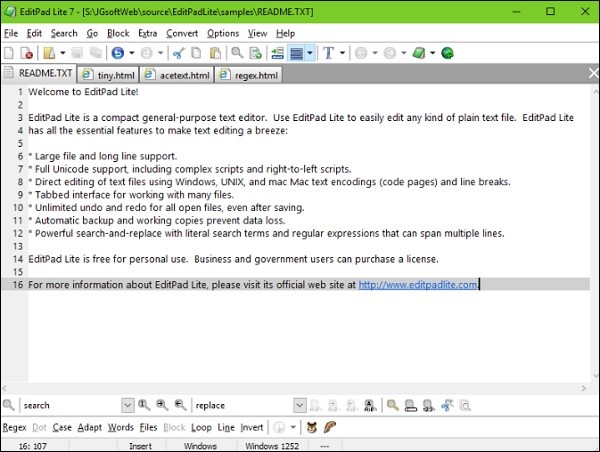
The next one in the list of most popular text editors is EditPad, which is another free tool. It can be downloaded from – https://www.editpadlite.com/.
Note − You should always use a text editor that you feel more comfortable working on.
XAMPP & LAMPP
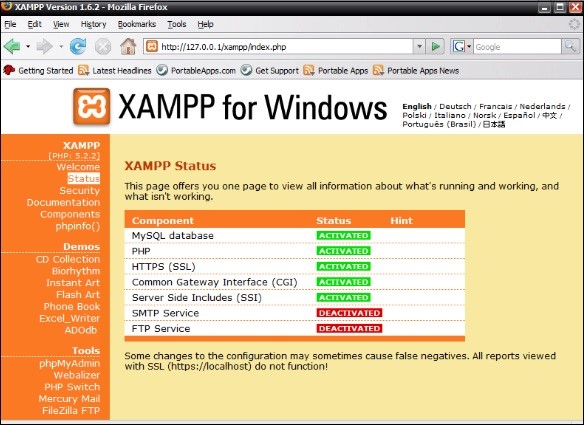
Another tool that you need to have in your computer when you are specially developing a dynamic webpage is – XAMPP for Windows OS and LAMPP for Linux OS. It has various products such as
Web Apache
MariaDB with phpMyAdmin for DB Management
PHP and
Perl Extra.
If you want, you can also create an FTP Server and Mail Server with Mercury.
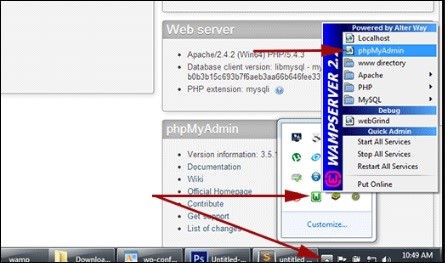
Another similar tool like XAMPP is WAMPSERVER, which can be downloaded from the following link – http://www.wampserver.com/en/.
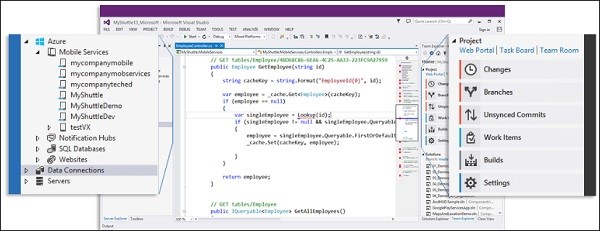
For developers who want to code ASP should have Visual Studio provided by Microsoft. It can be downloaded from – https://www.microsoft.com/web/.
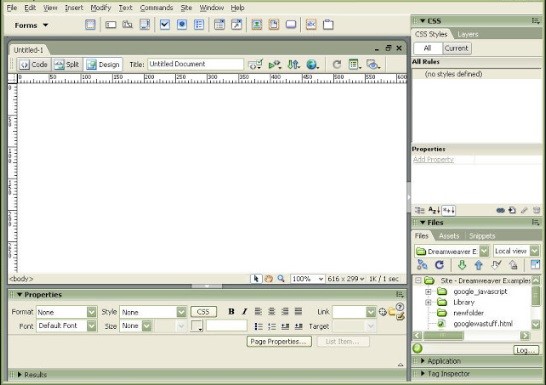
If you are a beginner and you are planning to develop a flat (static) website, you should have Visual HTML text editors called WYSIWYG. One of the most commonly used editors is Macromedia Dreamweaver. It can be easily downloaded from the following link – http://www.adobe.com/products/dreamweaver.html.
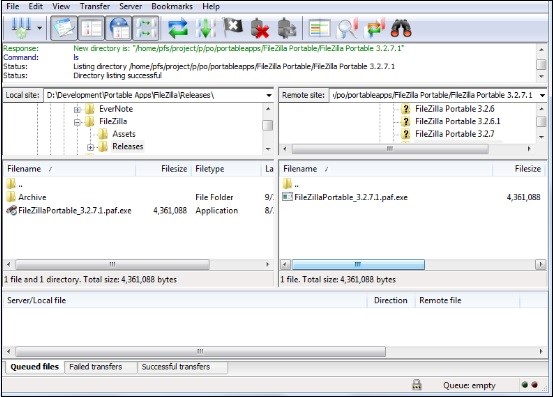
The other tool that you need to have is FTP Client, which is used to transfer files to the Hosting Container. Generally, these FTP Clients are free and can be easily downloaded from the internet.
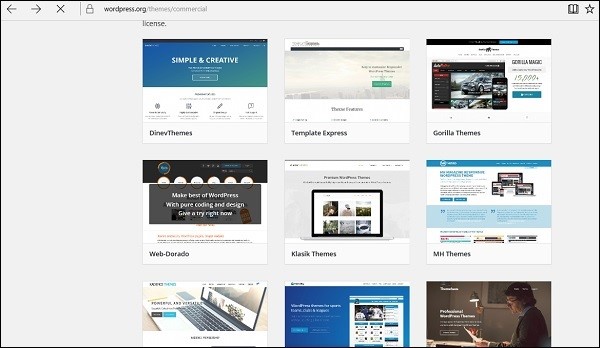
A theme is a personalized design of a website often including its layout. Changing your theme, changes the view of how your website looks on the front-end. Usually CMS platforms have both free and commercial versions. These themes are categorized as per their functions like
Business
IT industry
Hosting, etc.
Free themes are found in theme providers and they are free of charge, but sometimes the features are more limited than that of the commercial ones. Let us take the free WordPress themes as an example. These themes are found on the following link – https://wordpress.org/themes/, you can find and install them as per your business profile or needs.
When choosing a Web hosting company one of the main key indicators is to see their client’s satisfactory reviews and the price which is also important. As technologies and hosting industry changes too often and fast for an expert, we should be aware to check with following criteria’s.
Server Reliability / Uptime Scores – The most important point to know here is whether they have a 24×7 operating web host. You need a web host to operate on a powerful server and have stable network connections. Close to 99.5% and above is the recommended uptime score; anything below 99% is unacceptable.
A company that supports Multiple Add-on Domains.
Price of Hosting Signup and Renewal Cost. Hosting deals and shared hosting especially are normally selling very cheap on signup prices, but charge much higher on renewals.
What Refund Policy they are offering? – If you choose to cancel your host within the trial period, what are the implications? Does the company provides a full money refund? What is the hosting company’s refund policy after the trial session? Are there any cancellation charges?
Easy to use Hosting Control Panel. A user-friendly and functional hosting control panel is very important.
Account Suspension – What are the limitations? Here’s a money tip that most hosting review sites will not tell you – Hosting companies will pull the plug and suspend your account if you are using too much CPU power (yes, unlimited hosting is limited) or violating the rules.
Do they offer Backup. Are they free of charge?
Do they have 24/7/365 Live Chat Support.
CHOOSE A WEB HOSTING PLAN
Before choosing the right hosting plan, you should know what you need, a Windows OS based hosting or a Linux OS based hosting. This choice depends on the coding language that your website has. If it is ASP, it should certainly be a Windows based hosting and should also have an IIS server installed in it. If it has any other programming languages like PHP, Perl, Ruby, then you should go with Linux based hosting.
After you have decided on the type of hosting (Windows or Linux), you should define the right hosting plan.
You should take into consideration the following factors −
Disk Space
Bandwidth
Number of Hosted Domains
Number of Subdomains
Parked Domains
Versions of PHP, MySQL and Perl.
The main plans in general are as follows –
SHARED HOSTING
It is the most basic plan that every hosting provider offers. Shared hosting is fundamentally many hosting accounts located on one server. Some of them share the same IP address (although a dedicated IP address is often available for an additional fee). This plan will always offer a specific set of features and will always have resource limits. If you are not certain, then it will be better to start with a limited plan and later upgrade it after the website grows and gets more traffic.
HOSTING
VPS is a Virtual Private Server. This refers to the partitioning of a physical server into multiple servers where each one acts just like a dedicated server, each has its own operating system and can be rebooted separately. These operating systems receive a specific share of the resources of the physical server and they are isolated from each other. There are two types of VPS hosting −
Managed − Managed means that the patching is done by the hosting company by offering a CPanel in it.
Unmanaged − Unmanaged is a hosting where you should take care of your VPS in everything and there is no CPanel in it.
DEDICATED HOSTING
This is the most powerful type of hosting, which meets the requirements and needs of big businesses. Dedicated server owners can sell hosting services for a profit. They can choose the server specifications and environment. If you have heavy traffic, a very popular site, or a large customer database, then consider Dedicated Hosting. A dedicated server also provides more freedom to send emails and stream media.
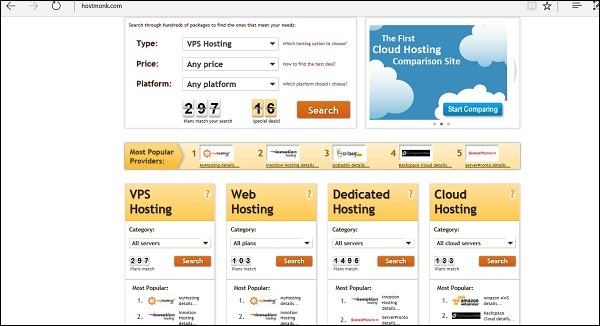
TIPS − The most important thing in hosting is to check prices of different Hosting Companies and their hosting plans prices with comparison websites for a better understanding. An example of a comparison website for checking prices of hosting companies is – http://www.hostmonk.com/.
C PANEL
Control panel is the administration web interface of your webhosting account. It is an interface that you access to administer all the aspects of your account. You can typically control all portions of your site within the control panel without using any additional software like FTP software to upload files, though many people find it faster and easier to do so.
Some web hosts use customized, proprietary control panels, but most of them use popular platforms. However, the leader of the industry is cPanel. It is the most spread out control panel among the hosting providers. The official webpage of cPanel is – https://cpanel.com.
Now let us discuss C Panel in detail and understand the most important aspects of it.
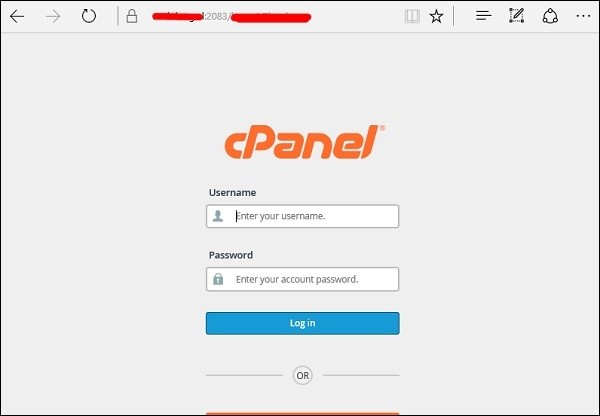
Firstly, to enter the C Panel you should type in the URL which the Hosting Company will give to you. This in general should be – yourdomain.com/cpanel. You should then enter your username and password which the hosting company has given you.
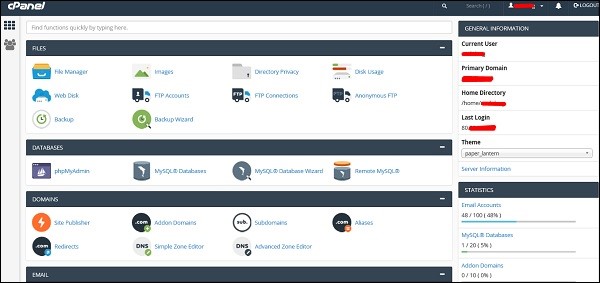
The main dashboard will be as shown in the following screenshot, where on the left-hand side, you will see the General Information, which will show the username, domain name, home directory and the IP address of the log in. On the left towards the bottom of the screen are the Statistics like databases used, email and the add-on Domains.
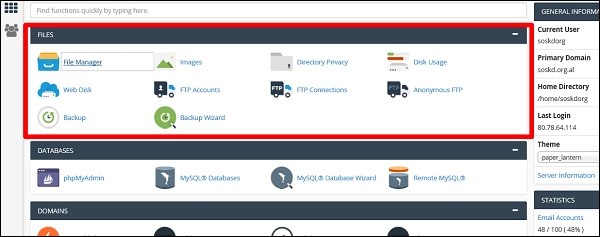
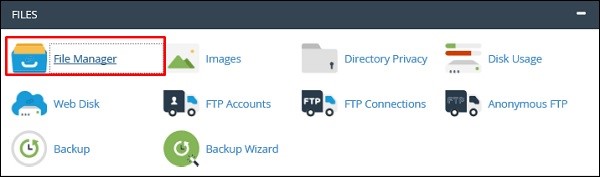
In the FILES section, the most important folder is of the File Manager, you can upload or download files of your webpage. The next important is FTP Accounts, where you can create users that can use programs like FileZilla to upload or download files.
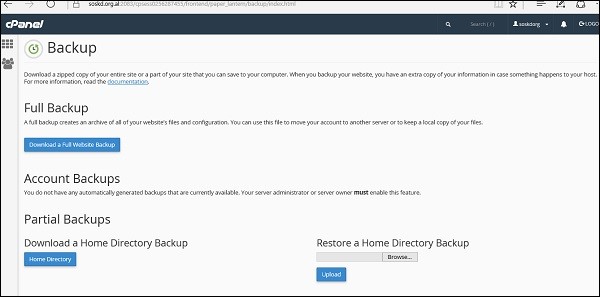
Taking a backup of the FILES section allows you to fully or partially download the webpage.
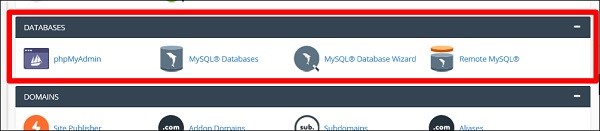
In the DATABASES, the phpMyAdmin is the most important section which allows you to manage the database of the webpages. It can edit, add, truncate databases and tables. The MySQL Databases allows you to create and delete the databases or users. The same thing can be done step by step with the MySQL Database Wizard.
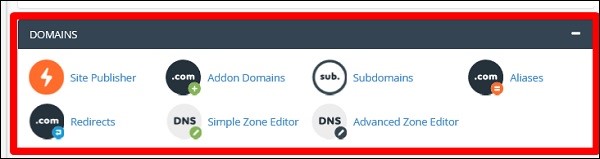
In the DOMAINS section, the Addon Domains folder is an additional domain that the system stores as a subdomain of your main site. You can use these Addon Domains to host additional domains on your account. The Site Publisher is used to quickly create a website from a set of available templates. The Subdomains folder is a subsection of your website that can exist as a new website without a new domain name.
In the EMAIL section, the most important folder is Email Accounts in which you can manage email accounts associated with your domain.
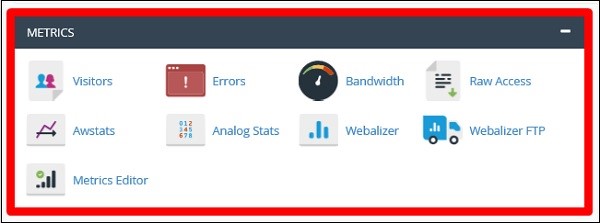
The Metrics section is more for statistics of your website. You can see each one will give different reports for your website.
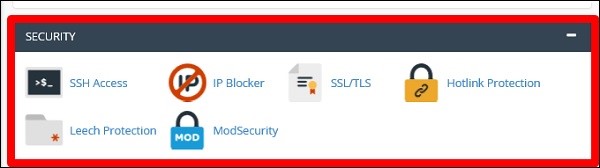
In the SECURITY section, the most important folder is IP Blocker, you can block any host or network that you don’t want to give access to your website. There is also ModSecurity that is used to secure Apache.
After understanding most of the important factors of Website Development, it is now time to set up a webpage. For setting up a webpage, we should adhere to all the steps given below.
Step 1 − Firstly, we purchased a domain name at GODADDY.
Step 2 − We chose the hosting provider based on the analysis of the hosting plans that we needed.
Step 3 − We configured the DNS records and the DNS servers of the registrar that in our case was GODADDY again.
Step 4 − Now that we are done with all the above-mentioned steps, it is time to upload the files of the webpage through CPanel → File Manager.
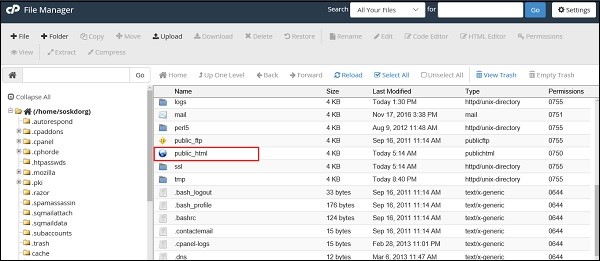
Step 5 − After opening it, upload the files in the folder named public_html as shown in the following screenshot.
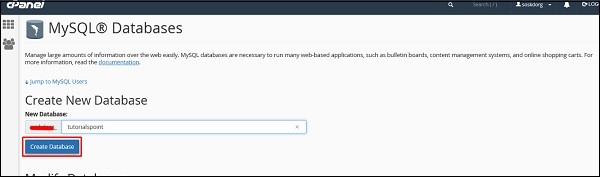
Step 6 − If you have a dynamic website, then you must configure the database too. To do it, go to MySQL Databases.
Step 7 − Click on Create New Database and then write the database name that your website will have and then click on Create Database as shown in the screenshot given below.
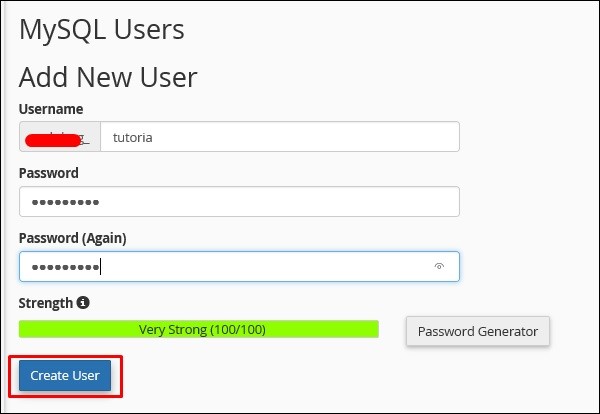
Step 8 − In the Add New User section type the Username and the password and then click on Create User.
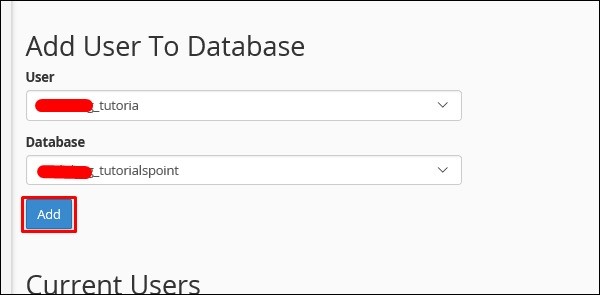
Step 9 − We must add the user that we created for this database to give rights or permissions to manage it.
HELLO FRINDS IN THIS SITE WE ALL GET KNOWDLEDGE OF TECHNOLOGY
FIRSLY WE START WITH THE TOPIC OF COMPUTER NETWORK
WHAT IS COMPUTER NETWORK?
A computer network is a set of computers connected together for the purpose of sharing resources. The most common resource shared today is connection to the Internet. Other shared resources can include a printer or a file server. The Internet itself can be considered a computer network.
TYPE OF COMPUTER NETWORK
There are mainly three types of computer networks based on their size: 1. Local Area Network (LAN) 2. Metropolitan Area Network (MAN) 3. Wide area network (WAN)
LAN’S
1. Local area network is a group of computers connected with each other in a small places such as school, hospital, apartment etc. 2. LAN is secure because there is no outside connection with the local area network thus the data which is shared is safe on the local area network and can’t be accessed outside. 3. LAN due to their small size are considerably faster, their speed can range anywhere from 100 to 100Mbps. 4. LANs are not limited to wire connection, there is a new evolution to the LANs that allows local area network to work on a wireless connection.
MAN
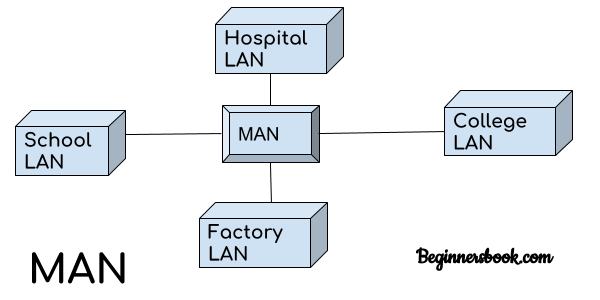
MAN network covers larger area by connections LANs to a larger network of computers. In Metropolitan area network various Local area networks are connected with each other through telephone lines. The size of the Metropolitan area network is larger than LANs and smaller than WANs(wide area networks), a MANs covers the larger area of a city or town.
WAN
Wide area network provides long distance transmission of data. The size of the WAN is larger than LAN and MAN. A WAN can cover country, continent or even a whole world. Internet connection is an example of WAN. Other examples of WAN are mobile broadband connections such as 3G, 4G etc.
Advantages of WAN:
Centralized infrastructure: One of the main advantage of WAN is the that we do not need to maintain the backup and store data on local system as everything is stored online on a data centre, from where we can access the data through WAN.
Privacy: We can setup the WAN in such a way that it encrypts the data that we share online that way the data is secure and minimises the risk of unauthorized access.
Increased Bandwidth: With the WAN we get to choose the bandwidth based on the need, a large organization can have larger bandwidth that can carry large amount of data faster and efficiently.
Area: A WAN can cover a large area or even a whole world though internet connection thus we can connect with the person in another country through WAN which is not possible is other type of computer networks.
Disadvantages of WAN:
Antivirus: Since our systems are connected with the large amount of systems, there is possibility that we may unknowingly download the virus that can affect our system and become threat to our privacy and may lead to data loss. Expensive: Cost of installation is very high. Issue resolution: Issue resolution takes time as the WAN covers large area, it is really difficult to pin point the exact location where the issues raised and causing the problem.
Interconnection of Networks: We have read LAN, MAN and WAN above, we also talked about internet. You can say that an internet is a combination of LAN, MAN and WAN.







 Technical Sumit